



Standard MRP is known as infinite capacity loading, which checks if orders fit within production capacity. However, finite capacity scheduling with a production scheduler verifies if a feasible schedule can be created without delays.
-
-
Production Scheduler in Indonesia
Production planning and load planning are closely related and require verification based on quantities. It is important to compare production quantities,…
続きを見る
What this article covers
- Standard MRP uses infinite capacity loading to check if orders fit within production capacity.
- In Indonesia, quantity-based production planning is common, often using Excel.
- Production schedulers assign tasks based on time to create schedules without delays.
- Finite capacity scheduling checks schedules within current resource and operating time constraints.
- The timing of safety stock generation varies based on the overlapping method between processes.
Differences in Quantity-Based and Time-Based Production Scheduling in Indonesia
In my experience, many manufacturing sites in Indonesia create production plans based on the quantity that can be accumulated against machine or line shifts and daily capacity. It's common to use Excel, considering each cell as a shift or a day.
Conversely, a production scheduler assigns tasks based on available working hours, such as 8:00 to 17:00.
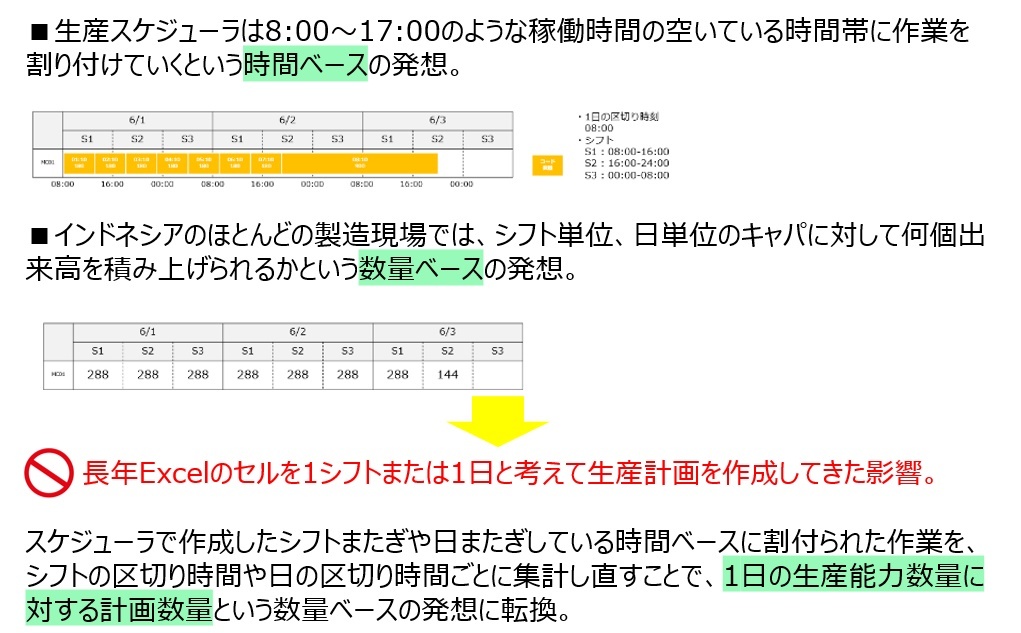
The difference can be expressed in IT terms as generating objects per shift/day or per production order. Despite the same goal of creating production plans, this difference in approach is not easily reconciled.
When introducing production schedulers in Indonesia (and likely across Asia), it's necessary to re-aggregate tasks assigned across shifts or days based on time.
Whether Excel's logic matched human thinking or vice versa is unclear, but without systems adapting to this reality, manufacturing personnel are unlikely to accept it.
Role of the Production Management Department
Relationship Between Production Planning and Load Planning
In Indonesia, as in Japan, the production management department (PPIC=Production Planning Inventory Control) creates a Master Production Schedule (MPS) based on confirmed orders and forecast information, considering product inventory and sequence.
This MPS is expanded according to the Bill of Material (BOM), and manufacturing orders are created considering lead times. However, in Indonesia, it's rare to use MRP systems for this; Excel is commonly used.
By arranging these manufacturing orders chronologically, a production schedule (monthly production plan) per item is created, which is what is referred to as production planning.
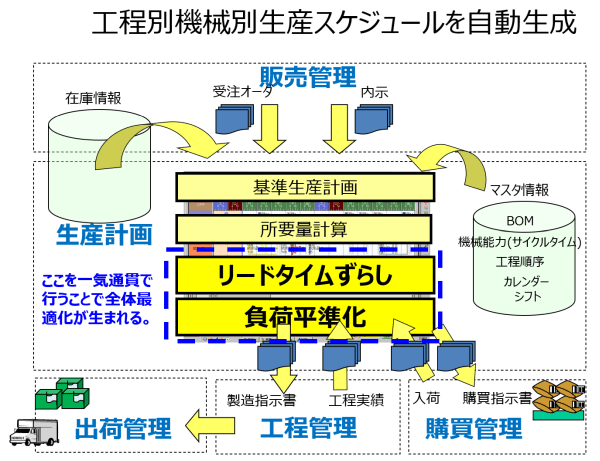
When issuing manufacturing instructions to the shop floor, it's necessary to allocate work to lines. The workload on the line is the load, and capacity planning involves predicting whether existing resources can handle this load, distributing it, adding overtime, or adding lines during production preparation.
Thus, production planning and load planning are inseparable, and errors in load planning directly lead to errors in production planning (delays).
Planning Tasks of the Production Management Department
The MRP in production management systems is an infinite capacity backward planning that stacks manufacturing orders per line. It manually levels and assigns alternative resources or schedules while confirming the existence of production resources and operating time to consume manufacturing orders.
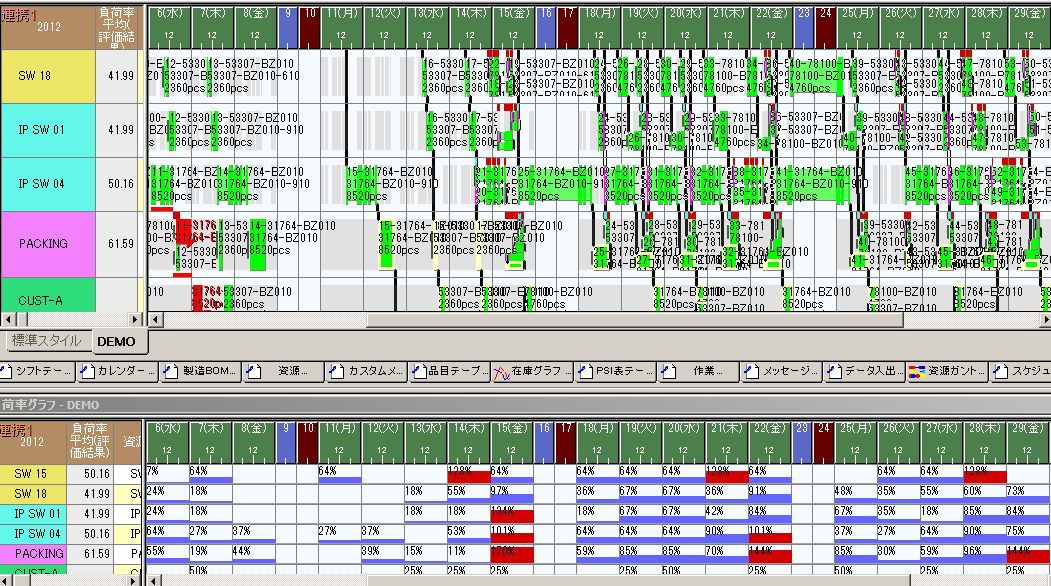
MRP links inter-process work vertically
In contrast, finite capacity scheduling considers current resource amounts and operating time constraints to check for overflow.
Differences in Forced Assignment and Ignoring Overflow
Difference Between Forced Assignment and Ignoring
If there is an adjustment command in the planning parameters, it controls how overflow tasks are assigned. Without it, these parameters are ignored. Forced assignment means forcibly assigning within the period with infinite capacity, while ignoring means assigning with finite capacity within the period and infinite capacity outside it.
Assignment Method in Backward Planning
If nothing is set when "exceeding the assignment start date" in backward planning, it behaves like forced assignment (infinite capacity). Tasks pile up on the right side of the planning reference date (within the planning period) because planning past dates is meaningless. To pile up overflow tasks on the left side of the planning reference date (outside the planning period) in backward planning, set "exceeding the assignment start date" to "ignore" (break through with infinite capacity assignment).
Assignment Method in Forward Planning
If nothing is set when "exceeding the assignment end date" in forward planning, it behaves like ignoring (break through with infinite capacity assignment), piling up on the right side of the assignment end date (outside the planning period). To pile up within the planning period in forward planning, set "exceeding the assignment end date" to "forced assignment" (infinite capacity assignment).
Checking Load Status for Delay-Free Production Planning
Production planners aim to create delay-free production plans, but equipment capacity may be insufficient. It's important to check daily load status, identify overload areas in advance, and take measures. By assigning forward and using forced assignment (infinite capacity) only when time constraint violations occur, resource and timing of overloads are identified. Backward assignment is based on deadlines, so delays don't occur, only overloads.
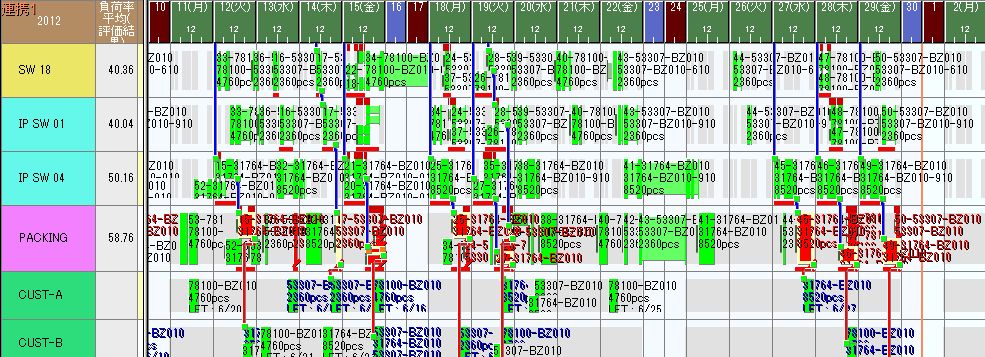
The earliest start date and latest end date are criteria for time constraint violations. Exceeding the latest end date in forward planning means "the previous process is too late for the subsequent process to catch up." Based on this result, decisions are made to change production plans or add overtime when and by what percentage overloads occur.
Cycle Time Plan and Capacity Plan
Breaking down tasks accumulated based on cycle time is to prioritize load leveling and create theoretically feasible plans without time constraint violations, focusing on the calendar (horizontal axis) of work schedule planning. However, issuing instructions to the shop floor doesn't guarantee tasks will be executed in order due to various on-site factors, and reflecting these elements in the system for rescheduling may not be realistic.
Therefore, under the condition of no delays, it's more realistic to stack work lots within the daily capacity and issue instructions like "consume this many work lots on each line today." This method emphasizes the vertical axis of resource capacity.
- Set "assigned resource amount flag" in the resource table to "proportional to production quantity"
- Set manufacturing capacity in the production BOM to fixed for one day (time bucket one day)
For "1 day 1 lot: daily capacity 8,000 units, 5 machines, resource amount 40,000 units"
- Set the maximum manufacturing lot size in the item table to the daily capacity (quantity) (1 day 1 box)
- Set the resource amount in the calendar table to the manufacturing lot size x number of resources (1 day's worth stacked for the number of resources)
For "1 hour 1 lot: daily capacity 8,000 units, 1 lot 1,000 units, 1 machine, resource amount 8,000 units"
- Set the maximum manufacturing lot size in the item table to the hourly capacity (quantity) (1 hour 1 box)
- Set the resource amount in the calendar table to the manufacturing lot size x number of resources (8 units stacked for 1 hour)
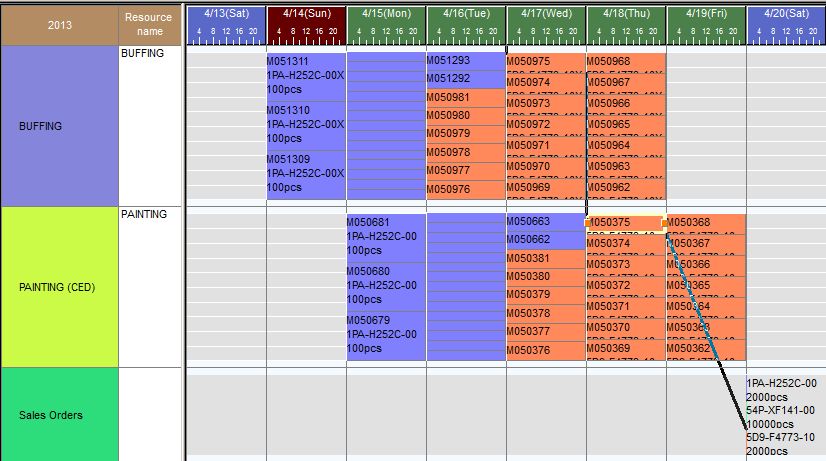
Checking Load with "Stacking" and Verifying Feasibility with "Breaking Down"
MRP's load calculation function sets standard load (cycle time) per item per line and calculates how many minutes of load are applied to the line based on order quantity. By "stacking" on days shifted by lead time (days) and comparing with daily line capacity, daily wins and losses can be confirmed.
The overflow of line capacity identified as a result of daily "stacking" is "broken down" to confirm if advancing can meet deadlines. This is automatically done by the production scheduler.
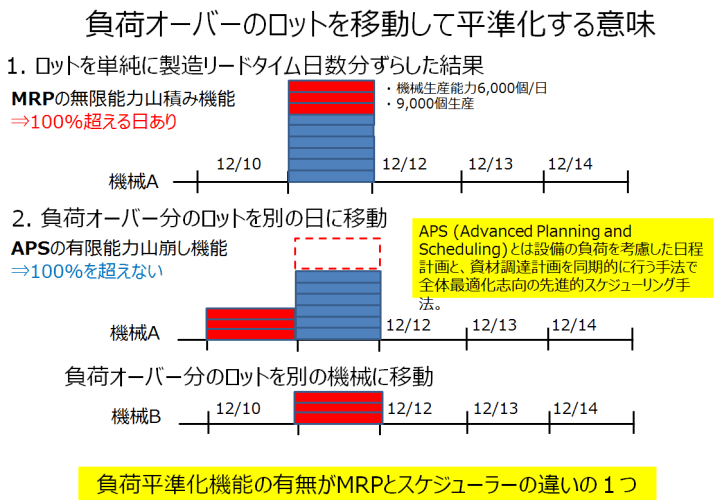
"Breaking down" means prioritizing tasks to avoid time constraint violations and creating a "theoretically feasible" schedule. This method emphasizes the calendar (horizontal axis) of work schedule planning.
However, setting 100% of the shop floor's constraints in the scheduler to create an optimized schedule is difficult. Therefore, rather than reflecting the "breaking down" results as the shop floor schedule, confirming that delays are unlikely through "breaking down" is sufficient. The realistic system operation method involves setting a few days of safety stock as a buffer.
Under the condition of no delays, it's more realistic to list work lots within the daily capacity and issue instructions like "consume this many work lots on each line today." This method emphasizes the vertical axis of resource capacity.
Relationship Between Overlapping Methods Between Processes, Safety Stock, and Lot Size
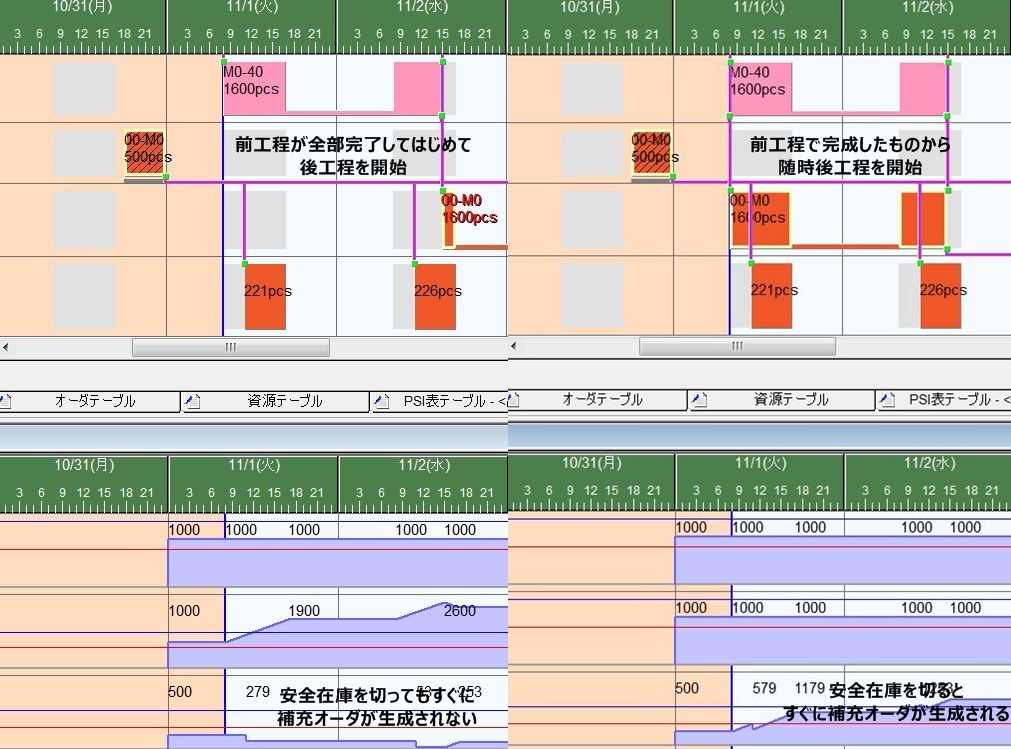
Results assigned with SE on the left and SSEE on the right
Safety stock is considered in generating replenishment orders during order expansion, but the timing of generation varies depending on the overlapping method between processes. In order expansion, the automatic replenishment function refers to the manufacturing BOM, generating replenishment orders (child) for shortages in order orders and further generating replenishment orders (grandchild) for their shortages.
If the overlapping method between processes is ES (End-Start), the replenishment order is generated at the start of the process since the subsequent process begins after the previous one is completed. Therefore, if shipments or inputs occur during the previous process's work period, safety stock may be depleted.
On the other hand, with SSEE (Start-Start End-End), replenishment orders are generated during the previous process's work by overlapping the previous and subsequent processes, reducing the likelihood of depleting safety stock. However, SSEE is based on the concept of flowing with a lot size of one, and in actual sites, it may not always be feasible to flow with manufacturing lot units or pallet units.
What Can Be Done with the "Breaking Down" Function
It's impossible to reflect 100% of the shop floor's constraints in the scheduler, so the accuracy of the generated schedule is not 100%. However, by utilizing the "breaking down" function, a theoretically feasible schedule without delays can be created, which the MRP "stacking" function in production management systems cannot handle.
This function allows setting the overlapping method between processes to SSEE and creating a schedule that adheres to safety stock as much as possible without generating numerous manufacturing orders, even without setting the lot size to one like in one-piece flow production.
Difference Between Seminar Agenda (Time Axis Occupancy) and Weekend To-Do List (Daily Stacking)
For example, when creating an agenda for a seminar, it's common to assign events to the time axis from start to end time.
- Starting with registration at 14:30, organizer's greeting for 10 minutes (15:00-15:10), first speaker for 60 minutes (15:10-16:10), break for 10 minutes (16:10-16:20), second speaker for 40 minutes (16:20-17:00), third speaker for 50 minutes (17:00-17:50), Q&A for 10 minutes (17:50-18:00) ...
This is because it's important to clearly assign tasks to the time axis, such as allowing participants to attend based on the speaker they want to hear or scheduling speakers in the first half if they need to return to Tokyo by evening.
Generally, when creating a schedule, like a WBS (Work Breakdown Structure) in system development projects, tasks are set on the vertical axis and the time axis on the horizontal axis, clarifying when to complete tasks.
On the other hand, when considering a "to-do list" for the weekend to finish accumulated tasks, it's important to see how much work can be stacked within the available time on the weekend. Deciding which task to execute first can be done on Saturday, and it's not a critical issue during the planning stage.
- Since my wife's sister and her husband are visiting on Saturday evening, the actual work time is 8 hours from morning to 5 PM. Remaining work for project 1 (2 hours), blog update (2 hours), nap to compensate for lack of sleep (2 hours), car wash (1 hour), shopping and errands at the print shop (2 hours), since time seems insufficient (capacity overload), I'll postpone the car wash to tomorrow ...
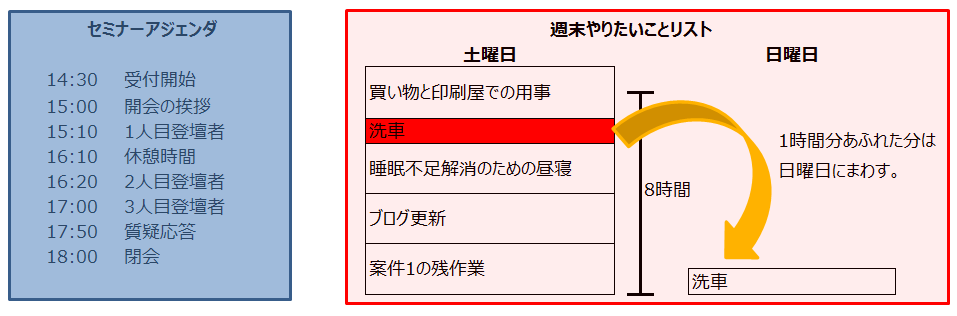
Concept of Consuming Maximum Resource Amount with Required Resource Amount
When considering a "weekend to-do list," there's an unconscious shift from "assigning tasks to the time axis" to "consuming available time with the required time for each task." Abstracting this, the "maximum resource amount" of 8 hours a day is consumed by the "required resource amount" of 2 hours for project 1, 2 hours for blog updates, 2 hours for a nap, 1 hour for a round trip to the car wash, and 2 hours for other errands.
Another example is the heat treatment process using a tunnel kiln, where the number of carts that can be set on the conveyor belt per day is 1000, consumed by "order quantity x required resource amount 1 cart."
- 1000 carts that can be set on the conveyor belt per day ⇒ maximum resource amount of the main resource (tunnel kiln)
- Order quantity x required resource amount 1 cart ⇒ required resource amount per item
- If the assigned resource amount flag is "normal"
The number specified in the manufacturing BOM's required resource amount is consumed per task. - If the assigned resource amount flag is "proportional to production quantity"
The resource amount is consumed by multiplying the task's production quantity by the number specified in the manufacturing BOM's required resource amount.
- If the assigned resource amount flag is "normal"
- Heat treatment time of the tunnel kiln ⇒ fixed lead time 1 day
The size of heat-treated items in the tunnel kiln varies, and if there's a limit on the number of carts in stock, set the maximum resource amount of carts to the stock number and set the cart passage time to a fixed lead time of 1 day, similar to the tunnel kiln's heat treatment time.
- Stock number of corresponding carts per item ⇒ maximum resource amount of the sub-resource (cart)
- Cart passage time ⇒ fixed lead time 1 day
Additionally, the smaller the item, the more can be loaded on the cart. By setting the loadable number in the output instructions per item, the heat treatment process yields output for the loadable number per order, and the heat treatment time per item in the tunnel kiln is inversely proportional to the loadable number.
Frequently Asked Questions | Infinite Capacity and Finite Capacity
Common questions about using stacking and breaking down.
What is infinite capacity stacking used for?
It's a method to visualize load imbalances in advance. By stacking without considering capacity, potential bottleneck candidates are identified.
Why is finite capacity breaking down necessary?
To fit tasks within actual equipment capacity. Meeting deadlines, setups, and alternative resources requires adjustments through rules and simulations.
Which should be started first?
First, share overload areas with stacking, then proceed to breaking down for an executable plan.