


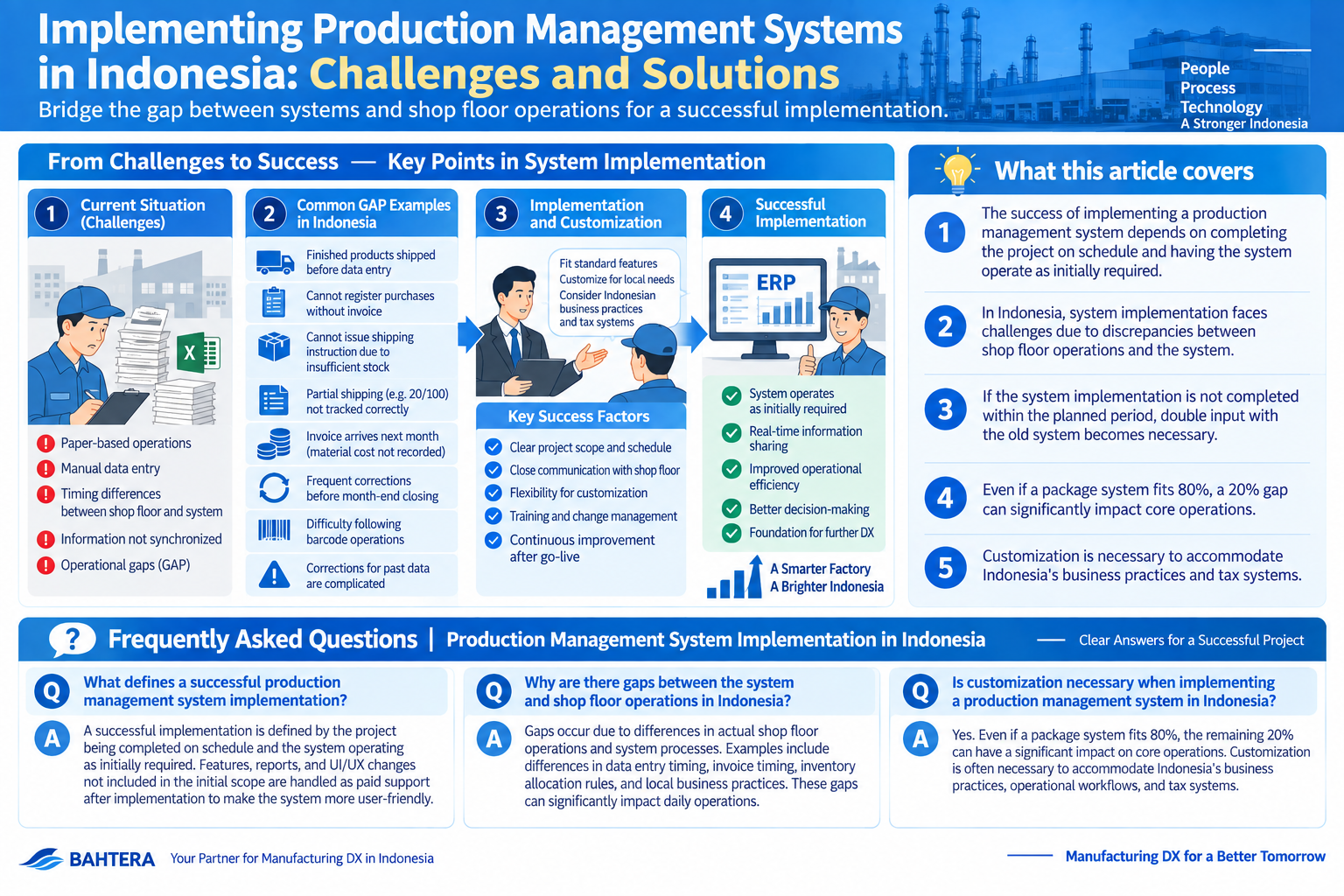
The success of a production management system implementation project is defined by the project being completed on schedule and the system operating as initially required. Features, reports, and UI/UX changes not included in the 'usable system' are handled as paid support after implementation, improving the system to make it more 'user-friendly'.
-
-
Production Management Systems in Indonesia
The ultimate goal in manufacturing is to improve productivity and meet delivery deadlines. Understanding the differences between manufacturing cost, cost of…
続きを見る
What this article covers
- The success of implementing a production management system depends on completing the project on schedule and having the system operate as initially required.
- In Indonesia, system implementation faces challenges due to discrepancies between shop floor operations and the system.
- If the system implementation is not completed within the planned period, double input with the old system becomes necessary.
- Even if a package system fits 80%, a 20% gap can significantly impact core operations.
- Customization is necessary to accommodate Indonesia's business practices and tax systems.
Discrepancies Between System and Shop Floor Operations (GAP)
Discrepancies between the system and shop floor operations (GAP) are unavoidable challenges in production management system implementation projects. Particularly in Indonesia, the following GAPs may occur during business system implementation:
- Case 1: Production results are entered by production management staff at 10:00 AM the next day, but finished products are shipped immediately during night shifts, resulting in insufficient inventory on the system and inability to issue shipping documents (Surat Jalan).
- Case 2: When a trading company procures goods, if the invoice has not arrived despite the goods being received, the system cannot register the purchase, preventing the goods from being stocked and shipped.
- Case 3: Shipping instructions for the next day's shipments are prepared the day before on the shop floor, but the system requires inventory allocation, preventing shipping instructions due to insufficient stock.
- Case 4: When issuing a shipping instruction for 20 out of 100 ordered items, the system should track the remaining 80 as unshipped orders, but it shows zero until shipping completion.
- Order: Shipping Instruction = 1:1
- Order: Shipping Completion = 1:N
The system's flow of 'Order > Allocation > Shipping Instruction > Shipping Completion' allows only 1:1 division between orders and shipping instructions, causing operational inconvenience.
- Case 5: When purchasing materials for the factory, invoices arrive the following month, preventing invoice registration for materials immediately used and costed in the current month, thus not generating cost calculation transactions.
- Case 6: During the process from order registration to shipping and invoice issuance, various corrections occur before month-end closing, preventing system reflection of physical inventory until corrections are completed.
- Case 7: Using barcodes to process material issuance and returns, and attaching labels for NG or separately managed items, the shop floor may struggle to follow the system's expected flow.
- Case 8: If errors are found in physical inventory input and corrections are needed for past production results, but the lot has already flowed to the customer, cancellations must be made sequentially from downstream invoices and shipping documents, affecting customer and partner document management and preventing corrections.
'Usable System' vs. 'User-Friendly System'
Japanese manufacturers in Indonesia are behind China and Thailand in systematizing business flows, gradually replacing manual Excel operations with business systems. The basic goal in production management system implementation projects is to create a 'usable system', but making it 'user-friendly' requires creativity within limited time and budget.
- Usable System = Business runs on the system.
- User-Friendly System = Easy to operate with convenient features.
Only after achieving 'usable' can 'user-friendly' be pursued, making it crucial to ensure a 'usable system' first in projects. Focusing too much on 'user-friendly' can hinder meeting the project success condition of 'completion within schedule'.
- It's expected that a system should be usable after paying for its implementation.
Such opinions exist, but reaching a level where business runs on the system requires significant energy from both implementers and users.
How to Implement a Usable System?
When implementing a system, everyone feels anxious about the project's success. The success of the project boils down to the following two points:
- The project is completed within the planned period.
- A 'usable system' is completed.
Pursuing system usability during the project period has limits, so it's important to set boundaries on the number and types of features and reports, addressing further 'usability' during the maintenance period for a fee. This is a significant role for Japanese working in IT in Indonesia.
Will It Be Completed Within the Planned Period?
A common issue during system implementation is whether it will be completed within the planned period. System cutover (referred to as Go Live in Indonesia) often aligns with the fiscal year's start in January or April, but if not met, double input with the old system is required, consuming time and causing opportunity loss. Causes of schedule delays include:
- Underestimating task man-hours.
- Incomplete task identification leading to unexpected tasks consuming man-hours.
In package software cases, tasks are mostly predetermined, reducing accounting omissions, but development-centric projects may experience man-hour estimation errors. System implementation steps involve narrowing down vendors through a Request for Information (RFI) and creating proposals and estimates based on a Request for Proposal (RFP), but it's common not to fully hear user requests at this stage.
Is a 'Usable System' Completed?
Post-implementation issues include whether business runs properly on the system. When adopting package software, carefully considering whether it matches company operations can mitigate risks. Causes of improper system operation include:
- Post-operation, gaps between business and system are discovered, delaying input.
- Business can't keep up with the system, delaying input.
Package systems are designed for use by many companies, so even if 80% fits, 20% may not. If this 20% affects core operations, it can lead to significant investment loss.
Case: A company implemented a system supporting only moving average and FIFO methods, but actual operations used the total average method, rendering the system unusable.
Key Point: If evaluation methods (total average, moving average, FIFO, etc.) don't match operations, the system may become unusable post-implementation.
To Avoid Risks
Points and factors prone to delays in the system implementation schedule can be predicted. When creating a schedule, breaking down the master schedule from monthly to weekly and daily, and dividing tasks vertically, allows for easy visualization of tasks and timelines.
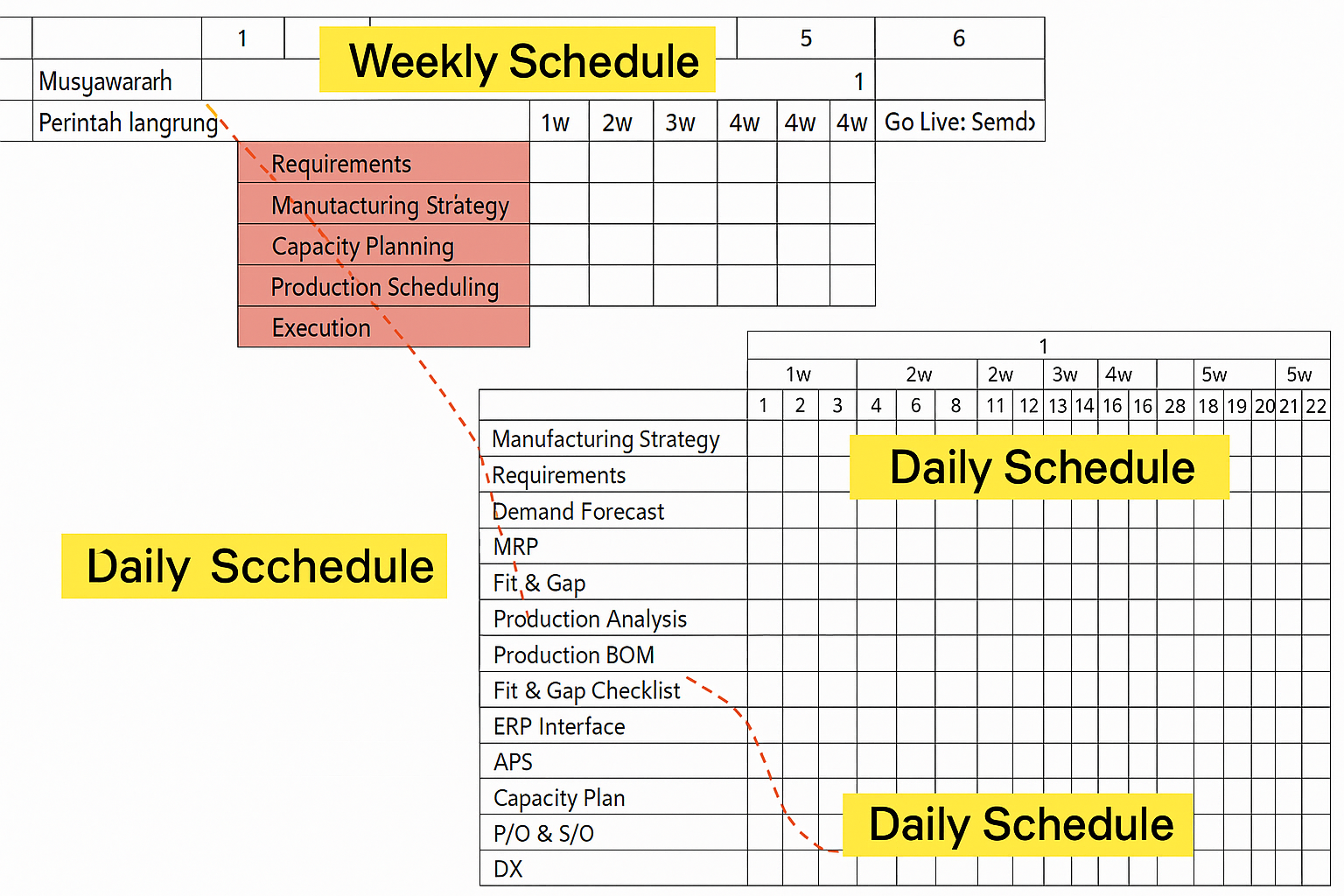
- Lack of resources on the implementation side
- Man-hour estimation errors
- Task accounting omissions
- Failure to consider non-working days
- Delayed master confirmation
- Delayed input of actual results
- Incomplete requests
The blue part of the overall schedule identifies fit and gap areas between user requests and system standard specifications, defining business and application flows. The red part is prone to delays, pushing out tasks to the next phase.
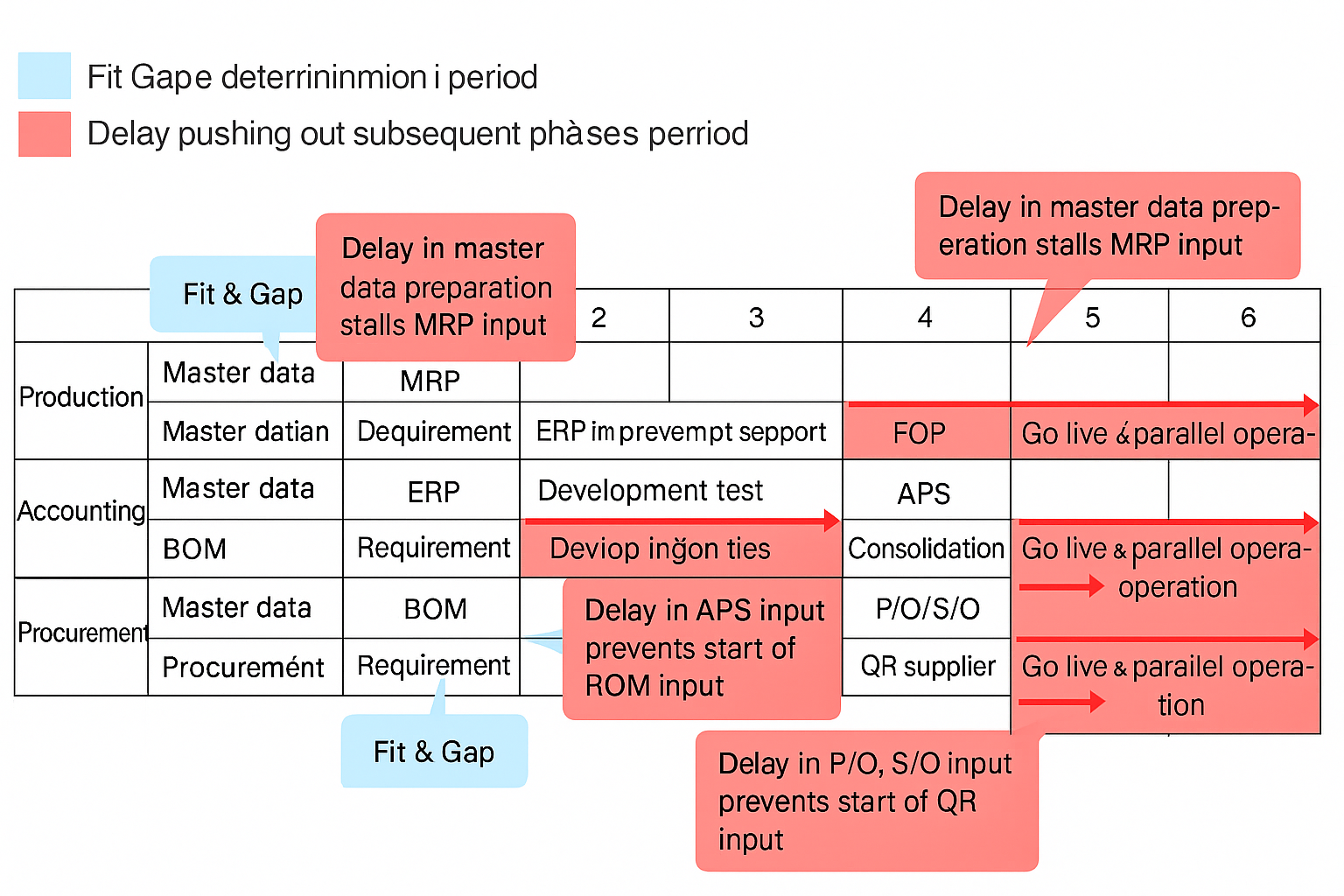
Customer situations for system implementation include new factory setups, manual Excel operations, and existing system operations. A blank slate during new factory setups is easiest for implementation, while factories with standalone systems scattered across departments are the most challenging. Introducing a new system into an existing system environment can cause friction during project progress.
If a factory has an existing ERP system, a complete overhaul means equal conditions for all departments, encouraging input. However, cases with standalone systems specialized for specific tasks, like purchasing P/O issuance systems or local accounting packages, are the most difficult.
Being aware of these in advance and progressing the project allows for sharing current status and forecasts during weekly meetings, reducing delay risks.
How to Implement a User-Friendly System?
After overcoming many challenges and enabling business operations on the system, new demands will inevitably arise from end-users, particularly requests for more user-friendliness.
- Make it more user-friendly.
User-friendly means having easy-to-operate and convenient features, with a screen layout that makes desired operations immediately apparent.
- Few menus (minimum necessary)
- Large buttons (visual appeal is important)
- Shallow hierarchy (maximum 2 levels)
I believe these three are essential specifications in Indonesia, but providing features that accommodate Indonesia's unique business practices and tax systems requires considerable customization.
- Reflect shipboard management of imports in accounting.
- Record provisional accounts payable (unpaid expenses) based on receipt.
- Include taxes and costs from import declarations (PIB) and goods release approvals (SPPB) in costs.
- Easily input results by scanning lot-based barcodes.
- Share information online for customs (bonded area) and internal use.
Case: These are examples of features that would be convenient for end-users in Japanese companies in Indonesia, but they can also operate without them.
Key Point: It's necessary to draw a line between which convenient features to implement in the system and which to handle manually, but for this, end-users must understand that 'customization requires man-hours'.
Case: In Indonesia, during fasting periods, staff leave early, making it impossible to enforce excessive overtime. Additionally, labor demonstrations can halt factory operations.
Key Point: Implementation plans cannot be based on excessive overtime, considering factors like fasting and demonstrations that restrict shop floor operations.
Frequently Asked Questions | Production Management Systems in Indonesia
Based on the content of this article, frequently asked questions are summarized briefly.
What are the main challenges of implementing production management systems in Indonesia?
The main challenge of implementing production management systems in Indonesia is the discrepancy (GAP) between the system and shop floor operations. Specific issues include timing of production result input, inventory management problems due to missing invoices, and mismatches between shipping instructions and inventory allocation. These GAPs can disrupt business flow.
What is the difference between a 'usable system' and a 'user-friendly system'?
A 'usable system' refers to a system where business operations run smoothly. In contrast, a 'user-friendly system' means it is easy to operate with convenient features. The priority in projects is to ensure a 'usable system', with 'user-friendly' improvements pursued later.
What are the success conditions for a system implementation project?
The success conditions for a system implementation project are completing the project within the planned period and completing a 'usable system'. Failure to complete within the schedule requires double input with the old system, reducing operational efficiency.