


Production schedulers are often seen as tools for delivery dates and load management, but allocation results are also planned work hours and planned quantities. By combining these with standard unit prices and wage rates, they form the foundation for next term's budget and product-specific standard costs.
Positioning of this article: It serves as the connection point from 'planning to standard costing/budgeting' under the production scheduler hub. It does not cover the full scope of accounting cost calculations but focuses on how to apply Asprova's planned values to cost metrics. For products, refer to Asprova, for constraint modeling refer to mold and operator constraints, and for accounting refer to accounting hub.
-
-
Production Scheduler in Indonesia
Production planning and load planning are closely related and require verification based on quantities. It is important to compare production quantities,…
続きを見る
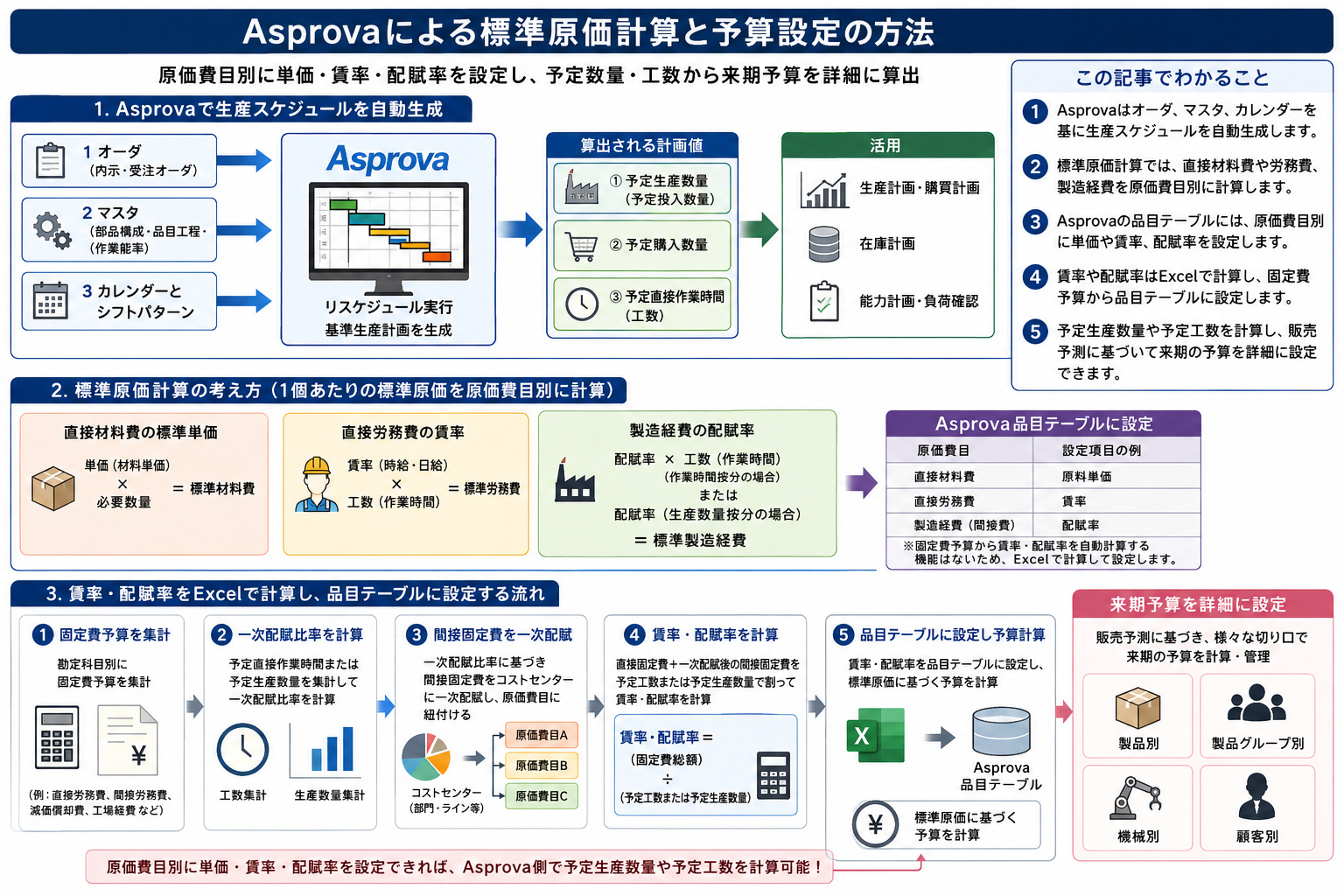
What this article covers
- This article is a definitive guide on linking production scheduler allocation results to standard costing and budgeting metrics.
- Asprova can derive planned production quantities, planned purchase quantities, and planned direct work hours from orders, master data, and calendars.
- Standard costing is constructed by cost elements (materials, labor, expenses) using unit price × quantity / wage rate × work hours / allocation.
- Wage rates and allocation rates are practically calculated from fixed cost budgets using Excel and set in the item table.
- Aligning delivery discussions and cost discussions on the same 'resource usage' makes it easier to prioritize in Indonesian factories.
- Cost accounting itself can be traced back to the cost/accounting hub, while planning logic can be traced to the scheduler hub/Asprova.
Why Discuss Standard Costs with a Scheduler?
Asprova generates production and purchasing schedules from orders (forecast and received), master data (BOM, item processes, work efficiency), and calendars/shifts.
- Orders (forecast and received orders)
- Master data (BOM, item processes, work efficiency)
- Calendar and shift patterns
When orders are rescheduled, you can obtain the following, for example:
- Planned production quantities (planned input quantities)
- Planned purchase quantities
- Planned direct work hours
This is the key point. The same plan used in delivery compliance discussions also serves as the quantitative basis for costs and budgets. If the plan is in Excel and costs are on a separate sheet, it quickly leads to double management in Indonesian factories.
Constructing Standard Costs (by Cost Element)
In standard costing, the standard per unit is constructed by cost element.
- Standard for direct material costs: unit price × required quantity
- Direct labor costs: wage rate × work hours
- Manufacturing expenses: allocation rate × work hours (time allocation) or production quantity allocation
In Asprova's item table, you can set raw material unit prices, wage rates, and allocation rates by cost element. However, since there is no function to automatically calculate wage rates and allocation rates from fixed cost budgets, it is common to calculate them using Excel and enter the results into the item table.
Steps to Create Wage and Allocation Rates from Fixed Cost Budgets
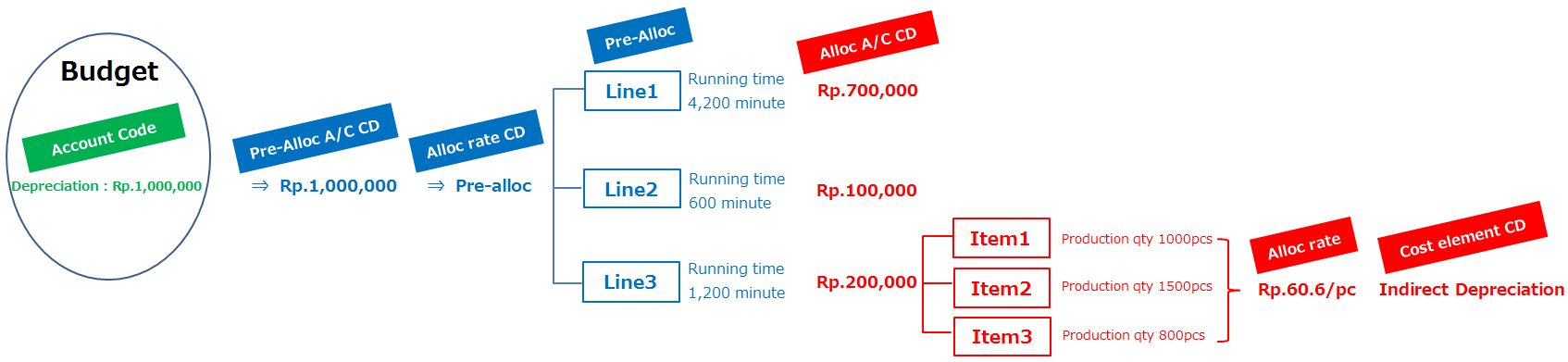
- Aggregate fixed cost budgets by account item
- Calculate the initial allocation ratio for indirect fixed costs not directly linked to cost centers from planned direct work hours or planned production quantities
- Apply indirect fixed costs to cost centers/cost elements through initial allocation
- Divide direct + indirect fixed costs by planned work hours or planned quantities to derive wage and allocation rates
- Set in the item table and calculate budget based on standard costs (by product, group, machine, customer, etc.)
Once unit prices, wage rates, and allocation rates by cost element are aligned, you can combine them with Asprova's planned quantities and planned work hours to slice the next term's budget based on sales forecasts.
Boundaries as Knowledge
- This article — Planned values on schedule ↔ Standard costs/budget
- Accounting/Cost Hub — Actual costs, variance analysis, framework of entries/accounts
- Mold and Operator Constraints — Resource modeling that underpins planned work hours
- Solver — Exploration of conflicting objectives like delivery dates, setups, inventory (entry point for including cost coefficients in objectives)
Frequently Asked Questions: Scheduler and Standard Costs
As production scheduler (APS) knowledge, we organize frequently recurring questions.
Why discuss standard costs with a scheduler?
Because allocation results determine resource usage and planned work hours. By placing them on the same foundation as standard unit prices and wage rates, delivery and cost discussions are connected.
What is the difference from actual costs?
Standards are a measure for planning and evaluation, while actuals are an aggregation of occurrences. To see variances, the granularity of actual data collection needs to match the planning side.
Can Asprova automatically calculate wage rates?
It is practical to calculate the unit prices, wage rates, and allocation rates from fixed cost budgets using Excel before setting them in the item table.
How to differentiate this article from accounting hub articles?
This article focuses on the connection between planned values and standards, while the accounting/cost side focuses on calculation methods, variances, and accounts. Please refer back and forth according to your purpose.
Related Links
- Production Scheduler Hub — Entry point for planning, APS, Asprova
- Asprova — Product definitive guide (Data Bridge / Viewer / Solver)
- Solver8 — Planning AI and demo surroundings
- Scheduling Optimization
- Mold and Operator Constraints
- Standard Costs and Budgeting
- Solver (Optimization Exploration)
- Production Management Hub — ERP and actuals side